Tuesday, December 18, 2012

TimeGlider - Create an interactive Timeline


Timeglider is a data-driven interactive timeline application. You can "grab" the timeline and drag it left and right, and zoom in and out — much as you would with a mapping app — to view centuries at a time or just hours. You can create create event spans so that you can see durations and how they overlap. Being web-based, Timeglider lets you collaborate and share easily.
 
You can create timelines about the last year of your family, the last century of world events, or about pre-historical (bce/bc) times. You can zoom in to see ten minutes, or zoom out to see billions of years.

Here is how TimeGlider Works:  http://timeglider.com/how_it_works

Check out this 5-page "How To:"  http://tinyurl.com/c9o65wb  If you are working with a class, this may be a handy guide to share.
The FREE version allows for 3 timelines for 1 user with 16 images.  Might be enough for a project...each student would create their own account.
And finally, a 2-minute YouTube on creating timelines with TimeGlider:            

Thursday, December 6, 2012

STUDYBLUE - Online Flashcards

Make, study and share online flashcards,
study guides and quizzes. Anytime. Anywhere.
Students can make and edit flashcards on their iPads using text, audio, and images

Tuesday, December 4, 2012

TitanPad - Collaboration Tool


TitanPad

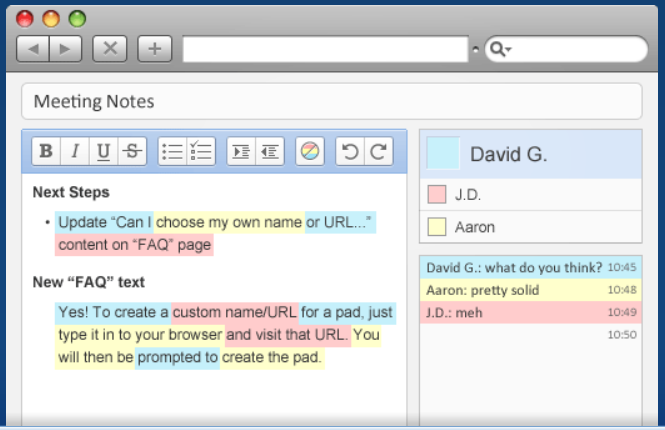
Allows multiple people to work on one document at the same time. Great collaborative tool. After creating your TitanPad you then share the link with those you want to use it and everyone can collaborate at the same time on the document. Once it is complete you can save, share, import/export, or continue to edit.


Tuesday, November 27, 2012

Blabberize


Blabberize  -  Add a voice to your images or create single image digital stories.  Blabberize allows you to quickly animate any image to make it talk, by simply adding audio and specifying the bottom lip or jaw section. Within minutes you have a talking photo and the novelty factor. Make a famous person speak, give an animal a voice, even add a mouth to an inanimate object like a hamburger and discuss its nutritional value.
Use Blabberize to turn any photo into a talking photo!
  • Upload a Picture to Blabberize

  • Select the Mouth on the Picture

  • Add audio and your picture is suddenly 'talking'!

    • Record using a Mic;
    • Use a previously recorded item.
Here is a quick YouTube on How to Get Started with Blabberize:      
               www.youtube.com/watch?v=eodrCTzi44Q
 
You may sign in as a Guest: UN:Guest   PW:Guest 
or create your own account
 

Ideas for the classroom:

·         Students can be asked to use text from history to make it come alive! e.g historic speeches or major laws that were passed and made a marked difference e.g. the law to desegregate

·         Have students record songs on poems demonstrating their knowledge of a topic and record the creation with Blabberize. For example: Photosynthesis Raps

·         It can be used to encourage students to prepare presentations to introduce themselves.

·         Students can be asked to use it to demonstrate their content knowledge.

·         Can be used to incorporate technology into a Reader's Theater activity.


Tuesday, November 13, 2012

SmileBox

www.smilebox.com
Hey, sorry about last week...no blog post.  A medical procedure interrupted my week...all is fine!!  Plus, I could use the excuse that it was a Election Day and a Professional Day at that!   :)
Here is a fun website:

Add your photos, videos and music to make a multimedia slideshow.
It’s fun and easy to be creative!  FREE!
This simple application for PC or Mac lets you quickly and easily create slideshows, invitations, cards, collages, scrapbooks and photo albums right on your computer or iPhone with the Smilebox App. With more than 1000 customizable templates to choose from, you'll find inspiration around every corner.
Now, you should be ready to make those Christmas cards, invitations, collages, slideshows, etc.  Too early for HAPPY HOLIDAYS?


Tuesday, October 30, 2012

SuperTeacherTools


SuperTeacherTools.com provides technology tools for teaching that are quick and easy to download, learn, and start using in your classroom.  Here is a list of available tools.

GAMES:


Classroom Management Tools:

For Fun:

This Flash file displays random facts for your amusement and amazement. They are all true and the desk will update about every 10 seconds. The facts are all school appropriate. Makes a nice screensaver for students who finish early durings tests or other activities.
There is even a Free Book Maker!
Hope you can find one of these useful, to engage students!!!


Wednesday, October 24, 2012

Poll Everywhere

What is Poll Everywhere?

The fastest way to create stylish real-time experiences for events using mobile devices.

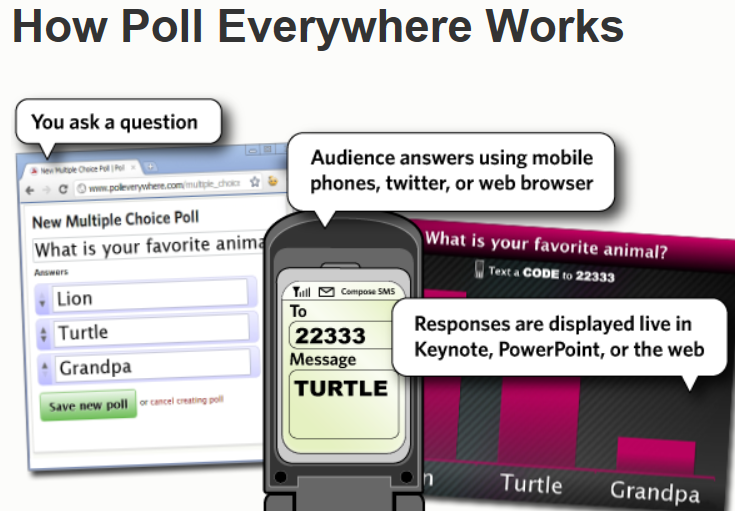
Poll Everywhere replaces expensive proprietary audience response hardware with standard web technology. It's the easiest way to gather live responses in any venue: conferences, presentations, classrooms, radio, tv, print — anywhere. And because it works internationally with texting, web, or Twitter, its simplicity and flexibility are earning rave reviews.

How much does it cost?

Plans for small classrooms to giant stadiums  Poll Everywhere is free for audiences of 40 people or less and they offer paid plans for larger audiences. K-12 and Higher Education semester-long plans are also available.


Tuesday, October 9, 2012

Easy Notecards

Easy Notecards is a free educational tool for students and teachers to create, study, print and share interactive notecards (flashcards) for their textbooks.


SEE the short video (1.50 minutes)
  Click on this button on the webpage

Notecards can be linked to a specific book and chapter(s) for better organization and easier searching.  A multiple choice quiz is automatically generated from the notecard data.  Each notecard set has a Helpfulness rating along with the ability to post a comment.  Members can use their locker to track their created notecards, favorites (notecards, books, members) and recent activity.  Search to see if notecards have already been created for YOUR text.


Tuesday, October 2, 2012

Stixy

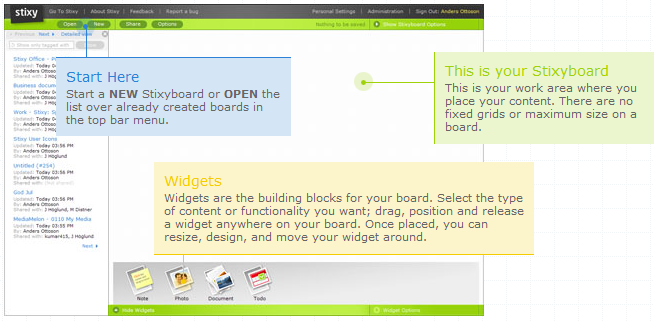
Stixy helps users organize their world on flexible, shareable web-based bulletin boards called Stixyboards. Users can add tasks, appointments, files, photos, notes, and bookmarks to their Stixyboards and organize them in whatever way makes sense to them. They can also share Stixyboards with friends, family, and colleagues.

How does the registration process work?
Simply provide an email address and choose a password. No further information is required. A welcome email is sent, but no activation is necessary. Users may begin to create Stixyboards immediately. Inviting others to the board is easily accomplished and an email invite is instantly sent to each person.
What does it cost to use the application?
Stixy is free and members can create as many Stixyboards as they want.
Who would you recommend the application to?
This application is aimed at the everyday user who is looking for a way to share information with others online. The bulletin board inspired look is designed to be user friendly and fun. The flexibility of sharing tasks, notes, pictures, and more makes this a useful tool for families and classrooms.

This is similar to WallWisher!!!

YouTube on "How to" create a stixy.