Showing posts with label Social Studies. Show all posts

Tuesday, May 7, 2013

Visual.ly - Create Infographics

VISUAL.LY - DISCOVER,    CREATE.    SHARE .....
http://visual.ly/
INFOGRAPHICS!
We all look in the lower left hand corner of USAToday to see the daily graphic!  We are visual learners .....Now, with Visual.ly we can create our own infographic with ease or use ones that have already been created. 
Visual.ly is a wonderful new webtool/resource that lets users both explore and create beautifully organized infographics. These visualizations can easily illustrate a complex idea and show a large amount of data in a simple to understand way. Students and teachers can create and find excellent representations using this unique site.
Click here to see the Top 20 Infographics created in 2011:
For Educators - Use the infographics created for discussions, examples, information or have students research to see if the data is accurate.   Then have students research data on any topic and create their own infographic!  Please notice that on many of the infographics, at the bottom, a "Source" is listed.  Teach students to give credit for the information.
Note: For best results use Google Chrome or Firefox 

Tuesday, April 30, 2013

TAGUL - Create Tag Clouds

Tagul is similar to Wordle. Both create customisable word or tag clouds, the difference is that Tagul’s clouds are embeddable into other websites such as blogs or wikis.
Tagul is a web service that enables you to create gorgeous tag clouds. It is created by Alex, an entrepreneur and tech geek from Moscow, Russia. You can read more in the FAQ section, visit the Blog or explore the Forums. 
It requires signing up with either a new Tagul account, or via some OpenID provider,

Wednesday, April 17, 2013

EDUcreations - Teach what you know - Learn what you don't.


www.educreations.com


Educreations is a global community where anyone can teach what they know and learn what they don't!


Educreations is a recordable interactive whiteboard that captures your voice and handwriting to produce amazing video lessons that you can share online. Students and colleagues can replay your lessons in any web browser, or from within the  app on their iPads. Check out the "Showcase" on the homepage or the "Featured" tab in the iPad app to view some great lessons that other teachers have created with Educreations.
Only public lessons may be embedded for viewing outside of educreations.com, so make sure to choose the "public" option in your lesson's privacy settings. Then, visit the lesson playback page for the lesson you want to embed. On the right side of the page, you'll find a link that says, "embed on the web." Once you click this link, you'll be prompted to copy an embed code that you can use to post your lesson anywhere on the web.


There are sections on English, Math, Social Studies,Science, the Arts, and Languages.

Tuesday, March 12, 2013

PADLET (Formerly Wallwisher)


http://padlet.com/

(The old Wallwisher)


  • Put the wall on your blog or website. Make it more wonderful.  Embed it!

  • Paste link to a youtube video? Check!

  • Drag a word document from your computer? Check!

  • Take a picture from your iPad camera? Check!

  • Keep your wall private between friends. If you like them, give them permissions like the ability to change what you write. If you are the social kind, make a public wall for the whole world to see.

  • Mobile:   Your phone, your tablet, your TV- Padlet works on everything.

  • Like flexibility? Use the free form layout. Like organization? Use streams.

EXAMPLES:


 I have used this as an "evaluation" tool.  After a presentation, I would ask participants to go the web address I give them and post a comment on the day's learning.  I am sure you can think of many other ways to use Padlet!!
How to use Padlet.com in the classroom?  from their Blog: http://tinyurl.com/awwy5ad   Click to see more ways to use!
"Teachers often write to us about how they use Padlet to pose a simple question to their class, or to collect exit tickets at the end of the class, or, sometimes, to collect assignments or projects from students."

Tuesday, February 19, 2013

WatchKnowLearn - Educational Videos

Imagine hundreds of thousands of great short videos, and other media, explaining every topic taught to school kids. Imagine them rated and sorted into a giant Directory, making them simple to find. WatchKnow--as in, "You watch, you know"--is a non-profit online community devoted to this goal.  Launched in October 2009 after a year-long development period, WatchKnow is a wiki-style portal that gathers and organizes educational videos for students ages 3 to 18. An age filter slider allows you to easily focus your search. 

The Vision behind WatchKnowLearn is simple:
To provide a world-class, online domain on which educators can store, categorize, and rate the best, K – 12 educational videos on the Internet today. And to make this service FREE so teachers, parents and students everywhere may have access to those videos.

WatchKnowLearn has indexed approximately 50,000 educational videos, placing them into a directory of over 5,000 categories. The videos are available without any registration or fees to teachers in the classroom, as well as parents and students at home 24/7.


Tuesday, February 5, 2013

ThingLink - Create video, music, text IN a picture!

http://www.thinglink.com

What is ThingLink?

ThingLink helps you create and discover rich images.

Be creative! Make your images come alive with music, video, text, images, shops and more!
Every image contains a story and ThingLink helps you tell your stories. Follow image channels from your favorite bands, bloggers and friends. Your ThingLink interactive images form a channel that other users can follow.
Share your channel with friends on Facebook and Twitter, and follow your friends. Touch and discover.


Here is a link to a picture for Valentines' Day
 
http://www.thinglink.com/scene/346325469999661056?buttonSource=searchPage
You may click on the hearts and get a history of Valentine's Day or a Beatles' song, "And I Love Her."
Click on the link above and see how this works...


You may search by a subject.  There are many pictures with Martin Luther King Jr. with clicking points for his "I have a dream" speech, facts about his life, and websites for additional information. 
 
Simple task:  Locate a picture that relates to your topic.  Attach videos, music, text, images, websites, etc.to create a "talking" picture.  I can see some very interesting presentations!!!

Tuesday, January 15, 2013

TagCrowd - WordCloud, TextCloud, or TagCloud

What is TagCrowd?    http://tagcrowd.com/

TagCrowd is a web application for visualizing word frequencies in any text by creating what is popularly known as a word cloud, text cloud or tag cloud.

A word cloud is a beautiful, informative image that communicates much in a single glance. TagCrowd specializes in making word clouds easy to read, analyze and compare, for a variety of useful purposes:

  • Topic summaries for Speeches and written works.
  • Blog tool or website analysis for search engine optimization.
  • Help writers and students reflect on their work.
  • Name tags
  • Resumes
  • Visual poetry
  • The list goes on and continues to grow.
There are three ways of entering text into TagCrowd to generate a word cloud:
  1. Enter the URL for a web page you wish to visualize,
  2. Paste (or type) the text you wish to visualize into the text box,
  3. Upload a plain text file to visualize.


Tuesday, December 18, 2012

TimeGlider - Create an interactive Timeline


Timeglider is a data-driven interactive timeline application. You can "grab" the timeline and drag it left and right, and zoom in and out — much as you would with a mapping app — to view centuries at a time or just hours. You can create create event spans so that you can see durations and how they overlap. Being web-based, Timeglider lets you collaborate and share easily.
 
You can create timelines about the last year of your family, the last century of world events, or about pre-historical (bce/bc) times. You can zoom in to see ten minutes, or zoom out to see billions of years.

Here is how TimeGlider Works:  http://timeglider.com/how_it_works

Check out this 5-page "How To:"  http://tinyurl.com/c9o65wb  If you are working with a class, this may be a handy guide to share.
The FREE version allows for 3 timelines for 1 user with 16 images.  Might be enough for a project...each student would create their own account.
And finally, a 2-minute YouTube on creating timelines with TimeGlider:            

Tuesday, December 4, 2012

TitanPad - Collaboration Tool


TitanPad

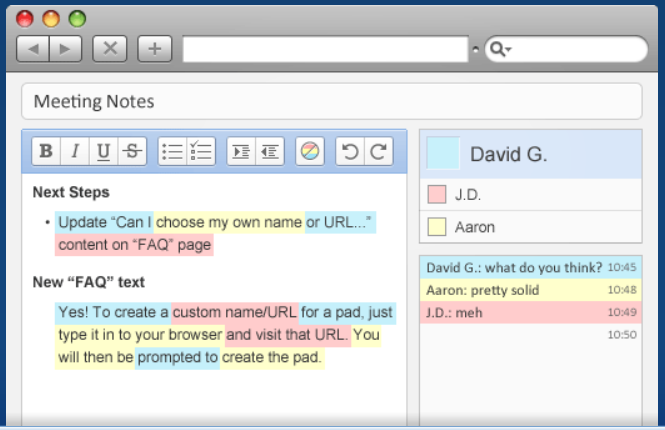
Allows multiple people to work on one document at the same time. Great collaborative tool. After creating your TitanPad you then share the link with those you want to use it and everyone can collaborate at the same time on the document. Once it is complete you can save, share, import/export, or continue to edit.


Wednesday, October 24, 2012

Poll Everywhere

What is Poll Everywhere?

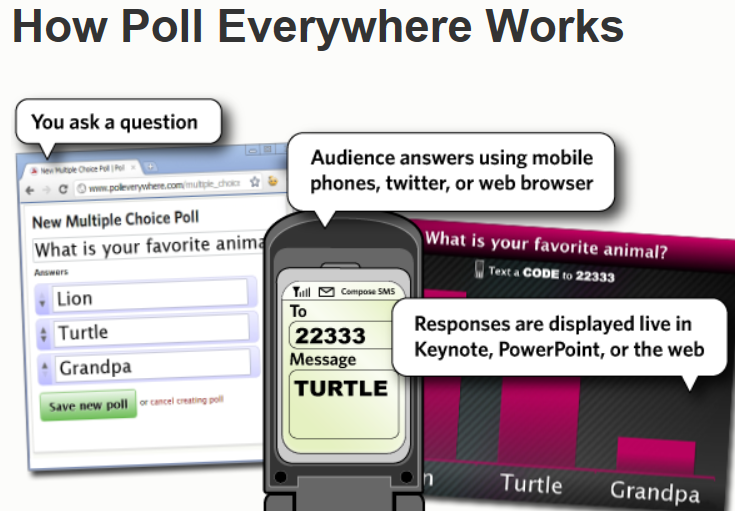
The fastest way to create stylish real-time experiences for events using mobile devices.

Poll Everywhere replaces expensive proprietary audience response hardware with standard web technology. It's the easiest way to gather live responses in any venue: conferences, presentations, classrooms, radio, tv, print — anywhere. And because it works internationally with texting, web, or Twitter, its simplicity and flexibility are earning rave reviews.

How much does it cost?

Plans for small classrooms to giant stadiums  Poll Everywhere is free for audiences of 40 people or less and they offer paid plans for larger audiences. K-12 and Higher Education semester-long plans are also available.


Tuesday, October 2, 2012

Stixy

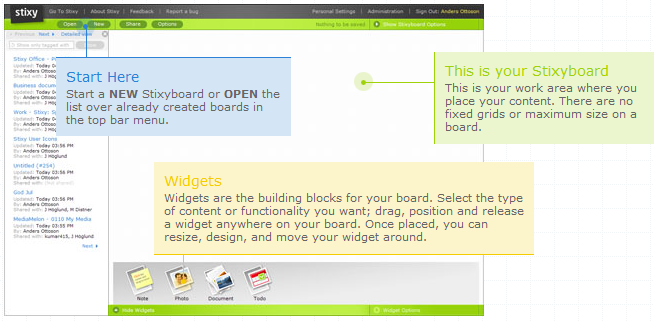
Stixy helps users organize their world on flexible, shareable web-based bulletin boards called Stixyboards. Users can add tasks, appointments, files, photos, notes, and bookmarks to their Stixyboards and organize them in whatever way makes sense to them. They can also share Stixyboards with friends, family, and colleagues.

How does the registration process work?
Simply provide an email address and choose a password. No further information is required. A welcome email is sent, but no activation is necessary. Users may begin to create Stixyboards immediately. Inviting others to the board is easily accomplished and an email invite is instantly sent to each person.
What does it cost to use the application?
Stixy is free and members can create as many Stixyboards as they want.
Who would you recommend the application to?
This application is aimed at the everyday user who is looking for a way to share information with others online. The bulletin board inspired look is designed to be user friendly and fun. The flexibility of sharing tasks, notes, pictures, and more makes this a useful tool for families and classrooms.

This is similar to WallWisher!!!

YouTube on "How to" create a stixy.
 

Tuesday, September 25, 2012

YouTube Time Machine

YouTube Time Machine
You have to try this!  Super cool! A great resource for history/social studies classes to show what was occuring in a particular year or use this in English Language Arts/Reading classes to put a book's time period into perspective for students.
Select a year and view videos from that year. There is a handy little search box.  Type in a year or something you remember from any time period, such as 9-11-2001.  You can select sports, video games, commercials, current events, television, movies, and music from that specific year. Amazing tool!!!

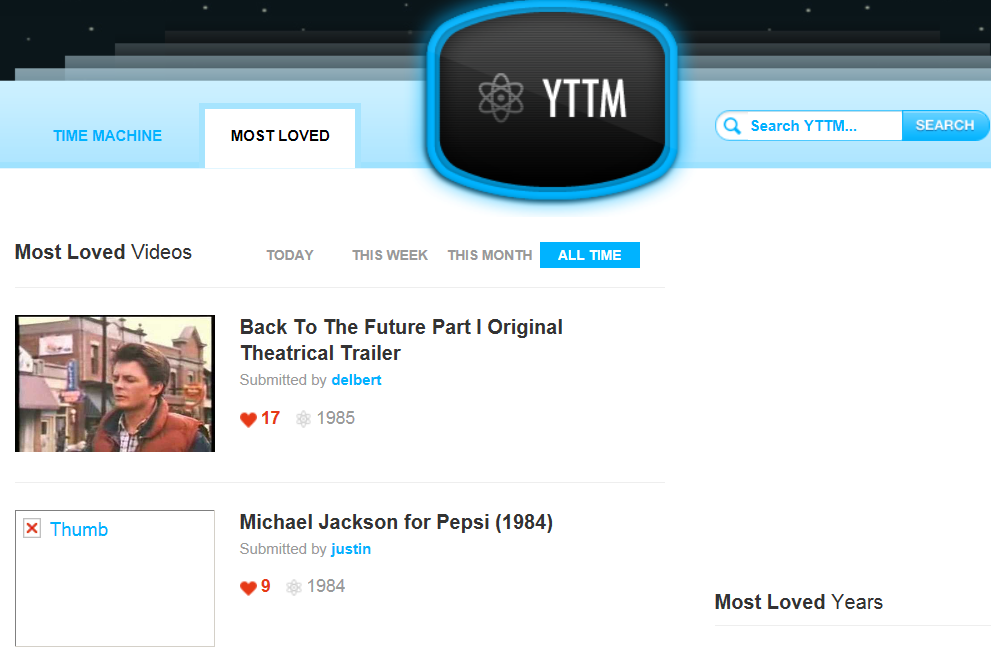
There is also a tab for MOST LOVED videos.  Shows you the most popular videos for today, this week, this month, and all time.

Hope you have time to give this a look....Try looking at all the videos, commercials, television, etc.  for your birth year!


Tuesday, September 18, 2012

FODEY - The Newspaper Clipping Generator


Fodey is a neat Web 2.0 tool that allows users to generate their own authentic newspaper clipping or one of the other "talking choices." Simply enter the name of a fictitious newspaper, date, headline, and story—and Fodey does the rest!

Besides being super easy to use, Fodey requires no log-in or registration. It also creates a pretty neat bulletin board worthy product!

To download your newspaper, use the link at the bottom of the generated image. You can use the images as you wish, ie. put them on your own website or blog. Please note, that direct linking to the newspaper clippings doesn't work; the images are deleted from the server after a short time span.

Tuesday, September 11, 2012

SKYPE in the Classroom

CONNECT YOUR CLASSROOM TO THE WORLD...                            http://education.skype.com/

Skype is a free and easy way for teachers to open up their classroom to the world! Meet new people, talk to experts, share ideas and create amazing learning experiences with teachers from around the world.

SKYPE is a free downloadable software that lets you do voice and video calls combined with instant messaging for free. The possibilities of Skype to flatten your classroom are endless.

This website, Skype in the Classroom, allows you to find other teachers using skype and the projects they wish to share with others.  You may find the perfect match for your classroom from anywhere in the world.  Just type in what subject you would like to share.  Or look at the projects currently being done...


Tuesday, May 8, 2012

NEWSEUM

NEWSEUM - A Museum of News!
Front Page Headlines Every Day from over  
800 World Newspapers!
      PLUS a LOT More!
I can't believe this has not been on my blog yet!  I love this site.  It gives me a world view of events that happen in our world.  After significant events such as 9-11, Presidential elections, or just normal every day events, show your students what has made the headlines today in Baltimore or Saudi Arabia or Australia or China or Paris or Russia or....you get the idea.  Show them and compare what has made the headlines.  Compare cities or countries - what is the headline today?

Through a special agreement with more than 800 newspapers worldwide, the Newseum displays these front pages each day on its website. The front pages are in their original, unedited form.
Newseum is an actual building in Washington D.C. See website for details.

Currently they have an exhibit on Presidential Campaign Ads:              http://www.newseum.org/exhibits-and-theaters/temporary-exhibits/every-four-years/campaign-ads/index.html

The most valuable aspect of the Newseum is the
Newspaper Headlines every day from across the world...AmaZing!!!
Educational Use:  Of course, the first thing that comes to mind is CURRENT EVENTS.  With Newseum, students can compare what the French or Saudi Arabian newspapers thought was their top story of the day.  Great discussion openers.

Monday, April 30, 2012

Popplet - Platform for Your Ideas

http://popplet.com
Collect Inspiration
Create Galleries
Record Thoughts
Explore Ideas
Collaborate Together

Click on the Box:  "Check Out Our Preview Video" to see what Popplet can do for you.

Think of it as a canvas where you put your ideas, pictures, videos and then connect them like mindmapping.

Click one of the small circles that hovers near your note (Popplet calls these "Popples") while you're editing to connect your images, thoughts, or videos. Clicking on those small circles will launch a connected blank note that you can edit.
Educational Use:

§  Encourage collaboration on team projects
§  Map concepts and create timelines
§  Visually show the connction between information and ideas
§  Assist with remembering new facts and figures

Monday, April 23, 2012

PENZU - FREE Personal Journal or Online Diary

Penzu is an online diary and personal journal that is focused on privacy. With a unique and compelling user experience, it makes writing online as easy and intuitive as writing on a pad of paper.

Penzu offers a secure place to store your thoughts and ideas in the cloud. Not only are entries password protected in an online account, but individual entries can be locked with military-grade encryption.
With powerful security also comes extreme ease of use. The core component of the interface is the Pad - a metaphor for a pad of paper. This universal design element has allowed Penzu to transcend language and cultural barriers as people from 170 countries continue to use the service. Penzu has made the user experience a top priority and it is one of the main differentiations from complicated and confusing competitors.

The name, Penzu, comes from many influences, but mainly it is a derivative of the Latin "pensare" which means to think or be full of thought.

Here is what the journal/diary page looks like:

Tuesday, April 17, 2012

The Plagiarism Checker

The Plagiarism Checker detects the plagiarized text or chunks of a text in your students assignments such as essays, articles …etc .Information has become accessible to almost everyone.  With a single click, students are able to download a whole ebook into their computers and exchange files and documents with a lightening speed . But I am afraid this technology boom has also brought around some negative side effects, i.e. "Cut and Paste."
How do I use
The Plagiarism Checker ?
Just go to The Plagiarism Checker main page . You will find a box there where you can paste the suspected text or paragraph you have copied and click on “ check the paper” button and that’s it.  Under the box it will state whether they think it is plagiarized or not.