Wednesday, May 16, 2012

VisuWords - Online Graphic Dictionary

VISUWORDS  - Online Visual Dictionary
·         It's a dictionary! It's a thesaurus!
·         Great for writers, journalists, students, teachers, and artists.
·         The online dictionary is available wherever there’s an internet connection.
·         No membership required.
Enter words into the search box to look them up or double-click a node to expand the tree. Click and drag the background to pan around and use the mouse wheel to zoom. Hover over nodes to see the definition and click and drag individual nodes to move them around to help clarify connections.

Tuesday, May 8, 2012

NEWSEUM

NEWSEUM - A Museum of News!
Front Page Headlines Every Day from over  
800 World Newspapers!
      PLUS a LOT More!
I can't believe this has not been on my blog yet!  I love this site.  It gives me a world view of events that happen in our world.  After significant events such as 9-11, Presidential elections, or just normal every day events, show your students what has made the headlines today in Baltimore or Saudi Arabia or Australia or China or Paris or Russia or....you get the idea.  Show them and compare what has made the headlines.  Compare cities or countries - what is the headline today?

Through a special agreement with more than 800 newspapers worldwide, the Newseum displays these front pages each day on its website. The front pages are in their original, unedited form.
Newseum is an actual building in Washington D.C. See website for details.

Currently they have an exhibit on Presidential Campaign Ads:              http://www.newseum.org/exhibits-and-theaters/temporary-exhibits/every-four-years/campaign-ads/index.html

The most valuable aspect of the Newseum is the
Newspaper Headlines every day from across the world...AmaZing!!!
Educational Use:  Of course, the first thing that comes to mind is CURRENT EVENTS.  With Newseum, students can compare what the French or Saudi Arabian newspapers thought was their top story of the day.  Great discussion openers.

Monday, April 30, 2012

Popplet - Platform for Your Ideas

http://popplet.com
Collect Inspiration
Create Galleries
Record Thoughts
Explore Ideas
Collaborate Together

Click on the Box:  "Check Out Our Preview Video" to see what Popplet can do for you.

Think of it as a canvas where you put your ideas, pictures, videos and then connect them like mindmapping.

Click one of the small circles that hovers near your note (Popplet calls these "Popples") while you're editing to connect your images, thoughts, or videos. Clicking on those small circles will launch a connected blank note that you can edit.
Educational Use:

§  Encourage collaboration on team projects
§  Map concepts and create timelines
§  Visually show the connction between information and ideas
§  Assist with remembering new facts and figures

Monday, April 23, 2012

PENZU - FREE Personal Journal or Online Diary

Penzu is an online diary and personal journal that is focused on privacy. With a unique and compelling user experience, it makes writing online as easy and intuitive as writing on a pad of paper.

Penzu offers a secure place to store your thoughts and ideas in the cloud. Not only are entries password protected in an online account, but individual entries can be locked with military-grade encryption.
With powerful security also comes extreme ease of use. The core component of the interface is the Pad - a metaphor for a pad of paper. This universal design element has allowed Penzu to transcend language and cultural barriers as people from 170 countries continue to use the service. Penzu has made the user experience a top priority and it is one of the main differentiations from complicated and confusing competitors.

The name, Penzu, comes from many influences, but mainly it is a derivative of the Latin "pensare" which means to think or be full of thought.

Here is what the journal/diary page looks like:

Tuesday, April 17, 2012

The Plagiarism Checker

The Plagiarism Checker detects the plagiarized text or chunks of a text in your students assignments such as essays, articles …etc .Information has become accessible to almost everyone.  With a single click, students are able to download a whole ebook into their computers and exchange files and documents with a lightening speed . But I am afraid this technology boom has also brought around some negative side effects, i.e. "Cut and Paste."
How do I use
The Plagiarism Checker ?
Just go to The Plagiarism Checker main page . You will find a box there where you can paste the suspected text or paragraph you have copied and click on “ check the paper” button and that’s it.  Under the box it will state whether they think it is plagiarized or not. 

Tuesday, April 10, 2012

Tools for English

Tuesday, March 27, 2012

Exploratorium: Science, Art & Human Perception

The Exploratorium is a museum in San Francisco with over 475 participatory exhibits, all of them made onsite, that mix science and art. It also aims to promote museums as informal education centers.

The Exploratorium isn’t just a museum; it’s an ongoing exploration of science, art, and human perception—a vast collection of online interactives, web features, activities, programs, and events that feed your curiosity.  Dive into a unique exploration of science, art, and human perception in the Exploratorium. Watch, view, experience, learn and play using hundreds of web pages and activities. Take a gross-out walk, dissect a cow's eye, make your own petroglyph...the choices are endless.

The online activities page of Exploratorium has learning activities for life science and physical science topics. From activities about sports science like fastball reaction time to activities about mutant fruit flies and activities about Antarctic ice, there is something to engage just about every science student.

In addition to the online activities page, Exploratium also offers some great online exhibitions and an online magazine packed with educational material. Science teachers looking for hands-on activities to use in their classrooms will want to check out Exploratorium's hands-on activities page. Those teachers and students that use Second Life will want to visit Exploratorium Island in Second Life.
Exploratorium has something for just about everyone. The bulk of the online activities can be accessed by students in the fourth grade or older. If you're not in a one-to-one computing environment the hands-on activities page provides some great directions for fun off-line learning activities. Some of the virtual tours could be used on a Smart Board/ White Board.

Tuesday, March 20, 2012

Converting Files: 4 Websites to Convert Files.


#1
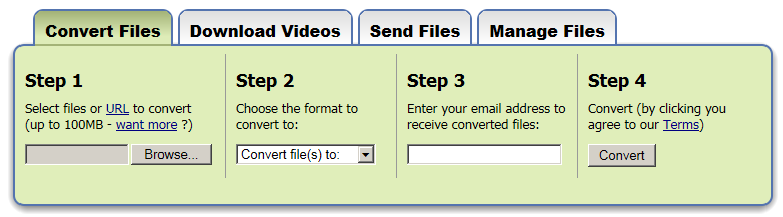
Zamzar... a lot of different file conversions and you convert right on this website!
No Program Download.


___________________________

#2
   ConverterLite  
Free Audio and Video
Conversion Software
ALWAYS FREE
ConverterLite is free software that uses the powerful FFmpeg project to convert audio and video files quickly and simply.
AUDIO and MP3 Converter
You can convert mp3 files to AC3, MP4, OGG, WAV and WMV. You can also convert mp4 to mp3 and any movie audio to mp3. Many audio conversion possibilities in major formats!
MOVIE and  VIDEO  Converter
Convert MPEG to AVI, FLV to AVI, F4V, and Quicktime MOV to AVI. You can also convert from AVI to MPEG or other major formats. Batch converting is possible for all formats.
MULTILINGUAL
May be used in English, Spanish, French, Chinese, Russian, Dutch, Japanese and many more languages
_______________________________________
#3
     Format Factory
is a multifunctional media converter. Free Download.

                                                                      http://www.formatoz.com
Format Factory's features:
1. Supports converting all popular video, audio, picture formats to others.
2. Repairs damaged video and audio file.
3. Reduces Multimedia file size.
4. Supports iphone,ipod multimedia file formats.
5. Picture converting supports Zoom, Rotate/Flip, and tags.
6. DVD Ripper.
7. Supports
60 languages
__________________________________________________________

#4

     Media Converter
http://mediaconverter.org 
Does not require students to submit any personal information at all (not even an email). Fast. Free.

Limited to 5 conversions per day on Free usage.


Tuesday, March 13, 2012

Digital Vaults -

The National Archives Experience:  The Digital Vaults
http://www.digitalvaults.org/

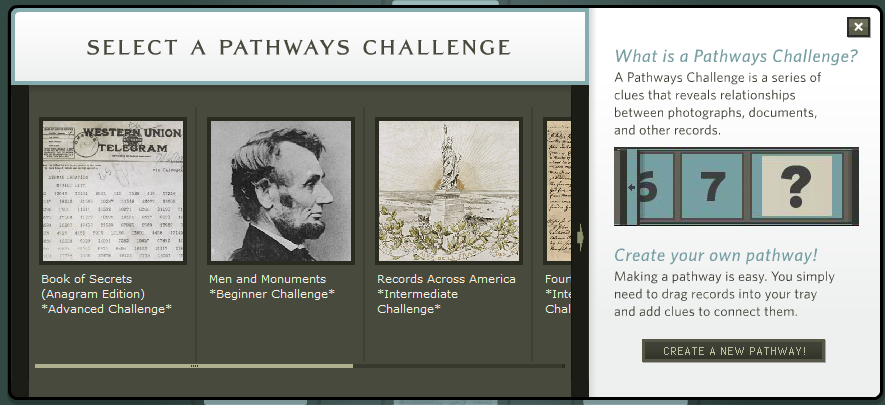
The National Archives new "Digital Vaults" exhibit delivers an online experience that is unlike any other. With a database of some 1,200 documents, photographs, drawings, maps, and other materials and a keywording system that visually links records, the Digital Vaults enables visitors to customize their exhibit experience and to create posters, movies, and games that can be shared by e-mail. Each record in Digital Vaults is also linked to the National Archives' Archival Research Catalog (ARC), so visitors who want to know more can take the first steps toward a research journey into the National Archives.
The site has a special interactive resources section for educators and students. Teachers can get great ideas on lesson plans using reproducible primary sources, find information on teaching activities correlated to National Teaching Standards, and engage in a variety of professional development programs - on-site or online. Students can explore the depth and diversity of the holdings of the National Archives for their own school projects, gear up for National History Day, or even pick up a virtual pen and sign the Declaration of Independence! 


Tuesday, March 6, 2012

SurveyMonkey

Survey Monkey is a web service that enables you to create and publish online surveys in minutes, and view results graphically and in real time.
I did not have this on the website, and felt it needed to be here!  Almost all of us have taken a SurveyMonkey survey, but have you created one?

    Here is what you get for Free:

On the website, there are additional Pricing Tiers you may choose.

It is easy to create a survey! 
Under Take a Tour, you will find How to
     Create Surveys
     Collect Responses
     Analyze Results

There is an online User Manual for SurveyMonkey:
http://s3.amazonaws.com/SurveyMonkeyFiles/UserManual.pdf