How to Use Bubbl.us on YouTube :
Tuesday, January 31, 2012
Bubbl.us - BrainStorming & Mind Mapping Online
Tuesday, January 24, 2012
Read Cube
is a desktop application, for Windows and Mac, that is designed to help students organize their research. Read Cube provides a place for students to save and annotate scholarly documents. Through Read Cube students can search Google Scholar and Pub Med. Students can also import to Read Cube PDFs that they find elsewhere. The video below offers a short overview of what Read Cube can do.
Classroom Use:
When you download Read Cube, it will ask you for your university email. Don't be discouraged by that, I was able to register using my K-12 school email account. But the fact they ask for your university email account is an indication that Read Cube is clearly targeted to a higher ed audience. Still, Read Cube could be useful for some high school students working on long-term research assignments. You might also consider using it yourself for your next continuing education course.
Tuesday, January 17, 2012
GameUP from BrainPOP
a collection of free online game titles that tie right in to curriculum.
Check out the Game titles below:
Pavlov's Dog
Control of the Cell Cycle
The Diabetic Dog Game
Blood Typing
Microbes
Immune System Defender
Cell Command
Math Games:
Dig It
Battleship Numberline
Food Fight
Science Games:
Close-Knit Neighbors
Pavlov's Dog
Alernative Energy Source
Control of the Cell Cycle
Life Preservers
Chronopticon
Fly to Mars
Microbes
Matter Sort
Build a Solar System
Food Fight
Social Studies Games:
Executive Command
Court Quest
Law Craft
Branches of Power
Argument Wars
AND there are
STUDENT-MADE GAMES
OR
You can Make Your Own!
Check It OUT!!!
Tuesday, January 10, 2012
NOTA - Collaborative Web Platform
Nota is casual collaboration.
Welcome to Nota! http://notaland.com/
Nota is a unique, cutting-edge collaborative web platform that allows users to create, share and collaborate on presentations and virtually any other form of online material. Using Nota’s proprietary toolset, users can instantly integrate text, video, maps, clip art, photos from web album or on the local computer, or license-free images from Flickr, and material from an ever-expanding array of sources. Users can then instantly embed their work in Facebook or blogs, and can share and collaborate with friends.
Quick Guide to using NOTA: http://notaland.com/howto
- It's easy to use, even for someone with no computer experience.
- Fast load times mean near instant co-creation.
- Embed anywhere including your blog and social networks - and it automatically pushes changes to all of these in real time.
- Also, it is purpose-built to work well with touch interfaces.
Wednesday, January 4, 2012
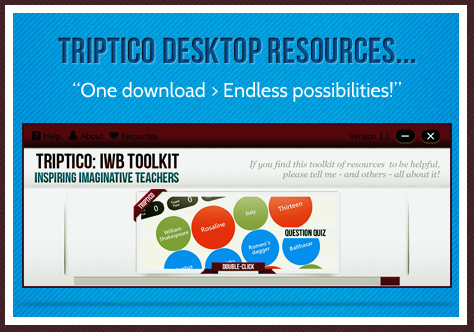
Triptico - 23 Interactive Resources
Welcome to the Triptico website.
The Triptico resource application currently contains 23 different interactive resources - all of which are easy to edit, adapt, save and share. ALL FREE!
You can access them all with one simple download... everything is completely free - and you will receive updates whenever new resources are added!
A variety of excellent classroom resources are available from Triptico. They work very well on the Interactive Whiteboard.
Note that Triptico resources are now accessed from a desktop application, free to download, so an Internet connection is not required to use the resources.
New resources are being added to the desktop application.
On starting the desktop application one is automatically notified if an update is available with any new resources added to the library.
Find10 was added in December for example.
Try Find 10, perhaps as a starter. This allows you to show 15 statements, 5 of which are incorrect, students have to find the 10 correct statements.
Because Triptico is an application that runs in your computer (it runs on Adobe Air, so it’s compatible with both Macs and PCs), it can be used with any make and model of interactive whiteboard.
From there you can easily navigate to any of the different interactive activity makers and you can then customise your own activities to suit your subject and lesson. As you can see, the resources on offer are often game-show inspired and range from (relatively) simple timers, image spinners and student selectors to games, quizzes and text analysis tools. The screenshots below give you an idea of the plethora of classroom-based interactive activities available:


Tuesday, December 13, 2011
Edistorm - Virtual Sticky Notes
Edistorm 
View an introductory video:
http://www.edistorm.com/users/welcome
On the surface, Edistorm reminds me of Wallwisher. Edistorm has some additional features and abilities that make it very useful in the classroom. Just like Wallwisher, you brainstorm and collaborate using virtual sticky notes. Edistorm gives you a place to organize ideas in a real-time interactive wall. Virtual sticky notes can each have their own color and can be organized in vertical or horizontal groupings. Edistorms can be created independently or with others in a collaborative effort. Edistorm features an idea bot that works at the bottom of the screen offering suggested ideas based on what students add to the sticky notes in the work space. There are a variety of bots including a rhyming bot, thesaurus, and related words. Creating public and solo storms is always free. Creating private storms requires a subscription.
Tip: Edistorm requires an email address for sign up.
Edistorm takes away the idea of sticky notes on a wall and makes it virtual. Brainstorm, think out ideas alone or with friends; plan out anything you like with Edistorm. Use virtual sticky notes in Edistorm to come up with a multitude of ideas all on one site. There is also an APP available for smart phones.
http://www.edistorm.com/users/welcome
On the surface, Edistorm reminds me of Wallwisher. Edistorm has some additional features and abilities that make it very useful in the classroom. Just like Wallwisher, you brainstorm and collaborate using virtual sticky notes. Edistorm gives you a place to organize ideas in a real-time interactive wall. Virtual sticky notes can each have their own color and can be organized in vertical or horizontal groupings. Edistorms can be created independently or with others in a collaborative effort. Edistorm features an idea bot that works at the bottom of the screen offering suggested ideas based on what students add to the sticky notes in the work space. There are a variety of bots including a rhyming bot, thesaurus, and related words. Creating public and solo storms is always free. Creating private storms requires a subscription.
Edistorm in the classroom: Edistorm offers an opportunity for students to brainstorm, collaborate, and group ideas. Students can use Edistorm to brainstorm ideas for writing, research, for grouping ideas, and collaborating on group projects. Create an Edistorm for your students and ask them to group like ideas, sort, and expand on thoughts. This could be done for any historical event, literature, science concept, and even phonics. Students could practice spelling by typing out their spelling words along with a sentence or synonyms on sticky notes. Then, they can group words by spelling pattern or common phoneme blends. Create an Edistorm of sticky notes with English words and sticky notes with a foreign language word on them. Students can work together to group words with their meanings. In math, create Edistorms with word problems on one color of sticky note and answers on another set of sticky notes. Students can work to create groups of problems and their solutions. Edistorm can be used for whole class activities using an interactive whiteboard, the class can brainstorm together and collect ideas or use the grouping feature in an activity created by the teacher or students.
Monday, November 28, 2011
EVERNOTE - Free notetaking app for your computer, your phone and your iPad.
Evernote allows you to easily capture information in any environment using whatever device or platform you find most convenient, and makes this information accessible and searchable at any time, from anywhere.
Website: http://www.evernote.com Cost: Free
Evernote makes it easy to remember things big and small from your notable life using your computer, phone, and the web.
Getting Started Guide:http://www.evernote.com/about/getting_started/Evernote makes it easy to remember things big and small from your notable life using your computer, phone, and the web.
Evernote is a free note taking app that works on any device; computer, phone, iPad, the web and syncs automatically. Because of the multiple ways you can capture information to make notes it is a must have classroom app. If you have an iPad 2 with a Smart Cover, Evernote Peek is a free app designed to help you study, learn and strengthen your memory. Learn how to get started using Evernote and Evernote Peek and discover powerful classroom application for teaching and learning with these free apps!
●
Drag and drop images into notes using the Evernote desktop client
●
Do a screen capture of content from your computer or the web using the Evernote desktop client
●
Create an audio note with your computer or mobile device
●
Snap a picture to create a note with your mobile device or computer webcam● Email notes to your Evernote account
Other ways to create notes:
Monday, November 21, 2011
GeoCube - World of Geography
Geocube…… re-inventing the way to explore Geography and our Earth...
The world of Geography at your fingertips and just a mouse click away!
Geocube is an attractive online resource about Geography. Geocube is based on the principle of the Rubik Cube with six faces and 54 topics. It is a virtual and easily accessible website which is available online for free. Move the Geocube around with your mouse and explore the faces and topics. Geocube provides an accessible way to read, see and watch what Geography is and geographers do. This is a European initiative developed by HERODOT, the European Network for Geography in Higher Education and is available to anyone who is interested in Geography.
The world of Geography at your fingertips and just a mouse click away!
Geocube is an attractive online resource about Geography. Geocube is based on the principle of the Rubik Cube with six faces and 54 topics. It is a virtual and easily accessible website which is available online for free. Move the Geocube around with your mouse and explore the faces and topics. Geocube provides an accessible way to read, see and watch what Geography is and geographers do. This is a European initiative developed by HERODOT, the European Network for Geography in Higher Education and is available to anyone who is interested in Geography.
| Great for Geography and/or Earth Science classes |
Be sure and click on "How to Use." This is a very short video on how to move the cube around for information. The six side general topics are listed below:
Under DOWNLOADS: Click on the links for downloadable pdfs of all the Geocube content:
Geocube - All Content (54 topics)
Geocube - Living Together (9 topics)
Geocube - Earth from all Angles (9 topics)
Geocube - Shrinking Planet (9 topics)
Geocube - Fascinating Earth (9 topics)
Geocube - Exploring our World (9 topics)
Geocube - Useful Geographies (9 topics)
Geocube - All Content (54 topics)
Geocube - Living Together (9 topics)
Geocube - Earth from all Angles (9 topics)
Geocube - Shrinking Planet (9 topics)
Geocube - Fascinating Earth (9 topics)
Geocube - Exploring our World (9 topics)
Geocube - Useful Geographies (9 topics)
Friday, November 18, 2011
ClassTools.net
Create free educational games, quizzes, activities and diagrams in seconds!
Host them on your own blog, website or intranet!
No signup, no passwords, no charge!
Templates:
- Fakebook Use "Fakebook" (looks like Facebook) to chart the plot of a book, the development of a character, a series of historical events, the debates and relationships between people, and so on!
- QR Game Generator [new!] Get students using their mobile devices to move and to learn
- Arcade Game Generator The Arcade Game / Quiz / Flashcard generator
- Random Name Picker (Fruit Machine)
- Countdown Timer
- Twister - Create Fake Tweets (like Twitter)
- Keyword Checker
- Plagiarizr
- Dustbin Game
- Telescopic Topic
- Post It
- Diamond 9
- Fishbone (Ishikawa)
- Venn Diagram
- Animated Book
- Timeline
- Lights Out
- Target
- Hamburger
- Living Graph
- Learning Cycle
- Jigsaw Diagram
- Priority Chart
- Source Analyser
Tuesday, November 15, 2011
Diigo - Social Bookmarking and More!
Diigo - Social Bookmarking
Awesome cloud-based information management tool that enables users to collect, highlight, access and share a variety of information, on a variety of devices.
Cost: Free
Availability: Online
Use Diigo to:
- Save important websites and access them on any computer.
- Categorize websites by titles, notes, keyword tags, lists and groups.
- Search through bookmarks to quickly find desired information.
- Save a screenshot of a website and see how it has changed over time.
- Annotate websites with highlighting or virtual "sticky notes."
- View any annotations made by others on any website visited.
- Share websites with groups or the entire Diigo social network.
- Comment on the bookmarks of others or solicit comments to your shared bookmarks.
To learn more about how Diigo can be used as as information management tool, visit these pages:
- Diigo 101 - Student Learning with Diigo
- Social Bookmarking and Diigo
Subscribe to:
Posts (Atom)